Soundboard Guide #
The essence of using the soundboard is managing faders and mixes. There are two faders, A and B. Here is how they are used. While a fader is selected you can then manage a mix. There are 13 mixes.
Fader A is used for mics & instruments as labeled on the soundboard, from the platform to the main house speaker
Fader B 1 & 2 (labeled MP3) is used for sound coming into the main house. Sound can come into the house from the following sources:
- Zoom
- The computer
- Other external device (eg. phone)
Managing Sound on Zoom #
Sending sound to zoom is effectively adjusting sound from house (church) to zoom. Use Fader A + Mix 13. It is possible to adjust each mic individually in this setting or use mono/ select (on the extreme right of soundboard) to adjust the overall volume going into zoom from house. Computer volume settings can also be adjusted…
Managing Monitors in the House (church) #
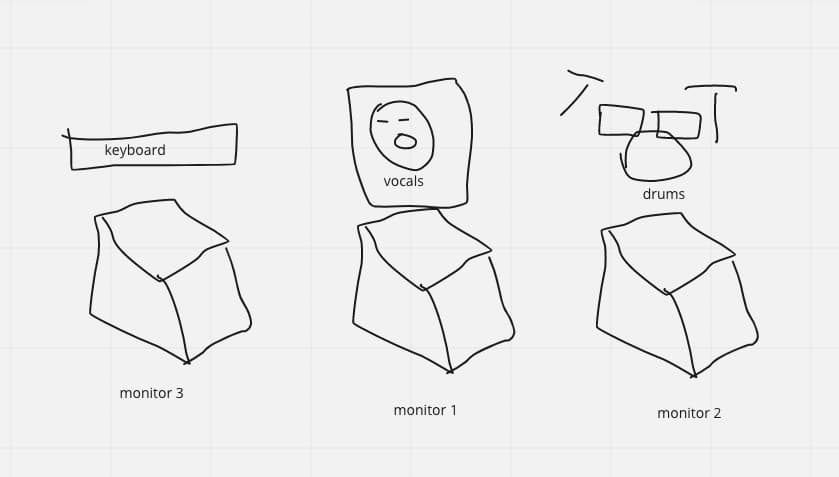
The monitors are the small speakers on stage. The musicians, speakers and chairperson depend on the monitors to help them hear what they sound like. There are three monitors.
- Mix 1 manages Monitor 1 (the middle for vocals)
- Mix 2 manages Monitor 2 (in front of drums)
- Mix 3 manages Monitor 3 (in front of keyboard)
See diagram:
Managing Incoming Sound #
Sound can come from the house or Zoom.
- For sound from the house (mics/instruments) - Use Fader A / 1 - 24 (with mixes disabled)
- For sound from Zoom - Use Fader B / Channels 1 -2 (with mixes disabled)
- For sound from external source - Use Fader B / Channels 1 - 2 (with mixes disabled)
It is possible to adjust sound directly on the source computer (eg. Playing a taped message or video from YouTube on the computer and sharing in zoom)